Browse our comprehensive product guides and documentation



Stella-Klein-Löw-Weg 8, 1020 Vienna, Austria



Gartner pegs worldwide IT spending at $6.31 trillion for 2026 – a 12.5% jump over last year. Impressive on paper. Less impressive when half that budget lands on tools nobody opens past the second Tuesday of onboarding. For B2B companies in growth mode, the real drain isn’t underspending, but purchasing software to fix problems that haven’t been properly diagnosed yet.
Rewind to Monday morning after any conference, even one where your team captured leads diligently. Two hundred contacts sit in five different places: a spreadsheet called “leads_final_v2,” a notes app nobody syncs, and a CRM that exactly one person trusts enough to open. Somebody sends a follow-up to a prospect who already replied last week. Somebody else creates a fresh record for a contact who’s been in the system since March under a slightly different spelling. A digital business card that feeds directly into the CRM solves the capture problem at the point of exchange, but the downstream tangle of lead management – who owns the lead, when to reach out, how to avoid sending the same email twice – still needs deliberate wiring. And when standard connectors can’t bend far enough, bringing in custom development isn’t extravagance, it’s damage control. Many companies discover that partnering with an external provider such as ncube.com makes sharper financial sense than recruiting a permanent engineer for a bounded project.
So the real question isn’t whether to buy more software. It’s whether the tools you already have are wired together well enough to keep up with what’s ahead. That answer lives in your actual workflows, not in the onboarding slide deck nobody’s touched since last year.
Every company believes its data flows smoothly. Then you ask three departments where the customer’s phone number lives and get four answers. Sales insists the CRM is the source of truth. Marketing swears by the email platform. Account management has a color-coded Google Sheet named “MASTER_v7_FINAL_real.”
Shadow the actual work. Trace a single prospect from first handshake through signed contract and first delivered project. At every junction, nail down:
Take a mid-size consulting firm whose partners rotate through three or four networking dinners a month. Contacts pile up in jacket pockets, phone apps, and LinkedIn DMs. Two weeks later, nobody remembers who expressed genuine interest and who was just being polite over the appetizers.
A workflow audit cuts through this fog. Watch people do their jobs, don’t just ask them to narrate the process. You’ll likely spot a “fully automated” report that still requires someone to massage a spreadsheet every Friday before leadership sees the numbers.
Sort every friction point by how much money it’s quietly costing you. A prospect left hanging for five days without a follow-up hurts far more than an ugly internal dashboard that three people open out of habit. Before any purchase order gets a signature, pin a number to it: halve the time it takes to process a lead, or push invoice errors below 2%.
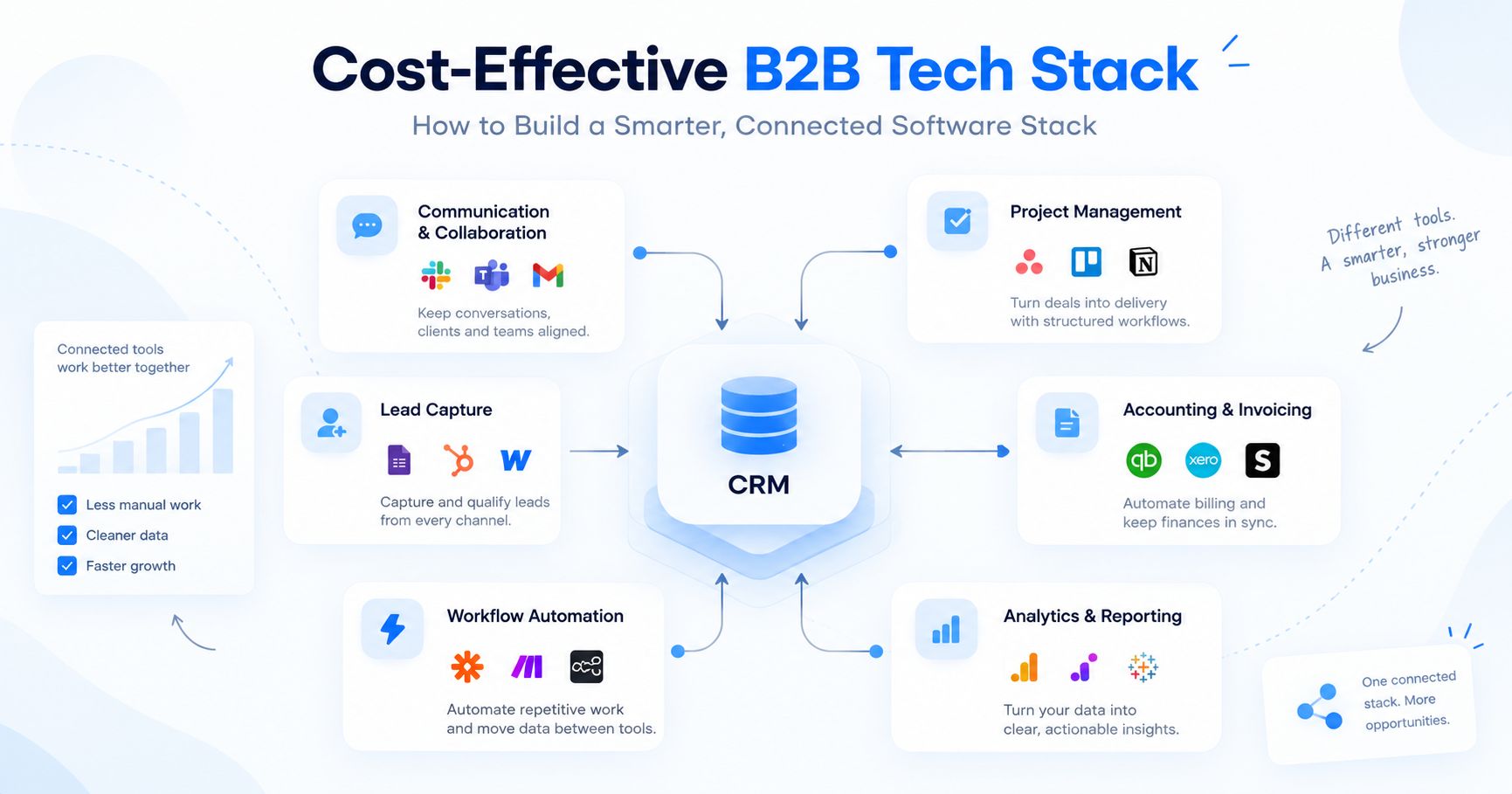
Every SaaS landing page whispers “you need this.” Most of the time, you don’t. A growing B2B operation performs best on a handful of systems that actually exchange data, not a bloated app drawer where half the icons collect dust. Five categories tend to carry the weight:
| Category | What It Does | Examples |
|---|---|---|
| CRM | Centralizes contacts, deal stages, communication history | HubSpot, Pipedrive |
| Communication & Collaboration | Handles email, calendars, documents, meetings | Google Workspace, Microsoft 365 |
| Project Management | Coordinates client work, assigns tasks, tracks deadlines | Asana, ClickUp |
| Accounting & Invoicing | Connects customer records with invoices and payments | Xero, QuickBooks |
| Workflow Automation | Connects apps when native integrations fall short | Zapier, Make |
Picking tools is the glamorous half. The unglamorous half (the half that determines whether the stack holds together in month nine) is deciding which system owns which slice of data. If a rep updates a client’s mailing address in the CRM, that change should ripple outward without three colleagues performing the same edit in three other tabs.
Take a branding agency that onboards ten clients in October. Each signed deal spawns a cascade: project workspace, account lead, welcome packet, retainer invoice. Automating even that single chain reclaims several hours a week and closes the gaps where nobody sends the intake form.
Start with one sequence. The most annoying one. Feed it real data, then sabotage it on purpose. Leave the phone number blank. Close a deal at 11 p.m. on a Saturday. Whatever survives gets promoted to production; whatever doesn’t gets patched before you touch sequence number two.
Appoint a stack owner. Somebody whose job includes pruning dead integrations, auditing user permissions quarterly, and answering “why do we still pay for this?”
That friendly $20-per-seat subscription multiplies faster than rabbits on a spring hillside.
Stop comparing intro-tier pricing pages. Build a three-year cost model that includes the unglamorous stuff: migrating data, training the team, growing the user count, and the exit penalty you’ll pay if the tool stops making sense. Ask the vendor one pointed question: what does our bill look like when the contact database triples overnight?
Cloud spending hides in plain sight. Flexera’s 2026 State of the Cloud Report reveals wasted IaaS and PaaS spend at 29%, the first increase in five years, and smaller B2B companies feel the bruises first. One orphaned storage bucket or a staging server nobody remembers launching can quietly drain the budget for an entire quarter. Monthly audits, zombie-license purges, and consumption alerts aren’t housekeeping – they’re financial self-defense.
But the vendor invoice is only the headline number. Human time has a price tag that never appears on a billing dashboard. Six hours a week of manual data shuffling – CSVs, date reformatting, copy-pasting client names across tabs – adds up to about $10,920 a year at $35/hour. A one-time $5,000 integration wipes most of that off the books before spring.
Factor in accuracy, too. A cheap tool that corrupts customer records (wrong addresses, phantom invoices) generates problems that cost multiples of the subscription to unravel.
A tool that shines in isolation can turn into dead weight the moment it has to share data with your actual stack. Before signing anything, put a few questions at the front of the line:
“We have an API” is the B2B software equivalent of “I’m a great listener” on a dating profile: sometimes true, often oversold. Some vendors gate essential endpoints behind enterprise plans or throttle requests until real-time sync becomes fiction.
Picture a parts distributor running separate platforms for orders and warehouse inventory. When stock levels shift but the sales app refreshes only overnight, reps quote delivery windows the warehouse can’t honor. That disconnect chips away at client trust.
Security deserves equal scrutiny. Multifactor authentication, granular role-based access, transparent data retention rules, and a clean process for revoking a departing employee’s credentials – all non-negotiable.
McKinsey’s Global Tech Agenda 2026 spots a recurring pattern: companies that outperform treat technology delivery as a product discipline, not a string of one-off projects. You don’t need an enterprise engineering department to steal that playbook. Even at 50 people, it pays to know who owns each system and what measurable result justifies keeping it around.
Lean on standard features wherever they do the job. Custom integrations feel like superpowers until the person who built them accepts a recruiter’s offer and takes the logic map with them. When custom work is genuinely unavoidable, write the documentation as if the next maintainer will be someone who’s never heard your company’s name.
Technology decisions should be revisited as the company changes, but growth alone is not a reason to replace working systems. A quarterly technology review provides a useful starting point. Examine:
The C-suite loves the dashboard. The sales floor has a group chat dedicated to complaining about seventeen mandatory fields just to log one phone call. Talk to both rooms before you decide whether the fix is training, fewer fields, or ripping the thing out entirely.
Set triggers for bigger changes. Entering a new geography might introduce invoicing rules your billing tool can’t handle. A sales team that doubles will outgrow a starter-tier CRM. Those are genuine business signals. A vendor announcing a flashy AI feature at their annual conference is not.
The leanest stack covers today’s operations with enough headroom for tomorrow’s realistic growth. Anchor it in real workflows, keep connections tight, measure the true cost. If a platform stops pulling its weight, the renewal date is your window to cut it loose.
If networking and events feed your pipeline, the capture step is the cheapest place to remove manual work. Tapni for Business lets teams share digital business cards and send new contacts to the tools they already use. Book a demo to see how it fits your stack.