Browse our comprehensive product guides and documentation
Business automation in 2026 is no longer a choice between “old workflows” and “AI everything.” The practical question is simpler: which parts of a process should stay predictable, and which parts genuinely benefit from software that can interpret context and choose what to do next? Traditional automation still powers dependable tasks such as CRM syncing, notifications, record creation, and scheduled reporting. AI agents add value when the input is messy, the path is not fully predefined, or a task requires several decisions across different tools.
That distinction matters especially in sales, customer experience, and networking workflows. A new contact captured at an event may need to be added to a CRM, tagged with a source, assigned to an owner, researched, summarized, and followed up with. Some of those steps are ideal for deterministic automation; others may benefit from AI. Tapni already sits in this intersection through smart business cards, lead capture, CRM sync, and AI-assisted business card scanning.
So the question for business leaders is not “Are AI agents replacing automation?” It is “Where should we use rules, where should we use AI, and where should we combine them?” If your focus is specifically on sales, Tapni’s guide to using AI for sales lead generation covers practical AI use cases across qualification, enrichment, prioritization, and outreach.
Understanding the difference helps teams avoid two expensive mistakes: forcing AI into workflows that already work reliably, and forcing rigid rules onto work that depends on judgment, language, or changing context.
Traditional automation refers to software that executes predefined logic when specific conditions are met. This includes scripts, API workflows, integrations, scheduled jobs, and Robotic Process Automation (RPA). The logic can be simple or sophisticated, but the expected paths, permissions, and outputs are explicitly designed in advance.
How Traditional Automation Works
A typical workflow follows a known path. For example, when someone submits a lead form, the system can perform the following steps without needing to interpret the situation:
Trigger: A specific event occurs, such as a contact submitting a lead form or scanning a QR code.
Execution: The workflow runs a fixed set of actions, such as creating or updating a CRM record, adding a source tag, assigning an owner, and sending a confirmation email.
Output: A predictable, structured result is produced and logged.
Well-designed traditional automation can include validation, retries, fallback branches, and exception handling. Its limitation is not that it “always breaks”; it is that the business has to define those paths in advance. When the workflow encounters ambiguity that was never modeled, it usually needs another rule or a human decision.
Primary Use Cases for Traditional Automation
CRM and Data Syncing: Moving structured contact or customer data between systems on a defined trigger or schedule.
Scheduled Reporting: Aggregating known metrics into standardized dashboards, exports, or spreadsheets.
Transactional Workflows: Creating receipts, status updates, tasks, notifications, or audit records after a known event occurs.
Traditional automation is still the right choice for high-volume, repeatable work where consistency matters more than interpretation. In many businesses, these workflows should remain the dependable backbone even as AI is added around them.
An AI agent is software that uses an AI model together with instructions, context, and tools to pursue a goal across one or more steps. Instead of following only a fixed branch of rules, an agent can interpret an input, decide which tool or data source to use, evaluate the result, and determine the next action. Some agents also use short- or long-term memory to preserve context across a task.
How AI Agents Work
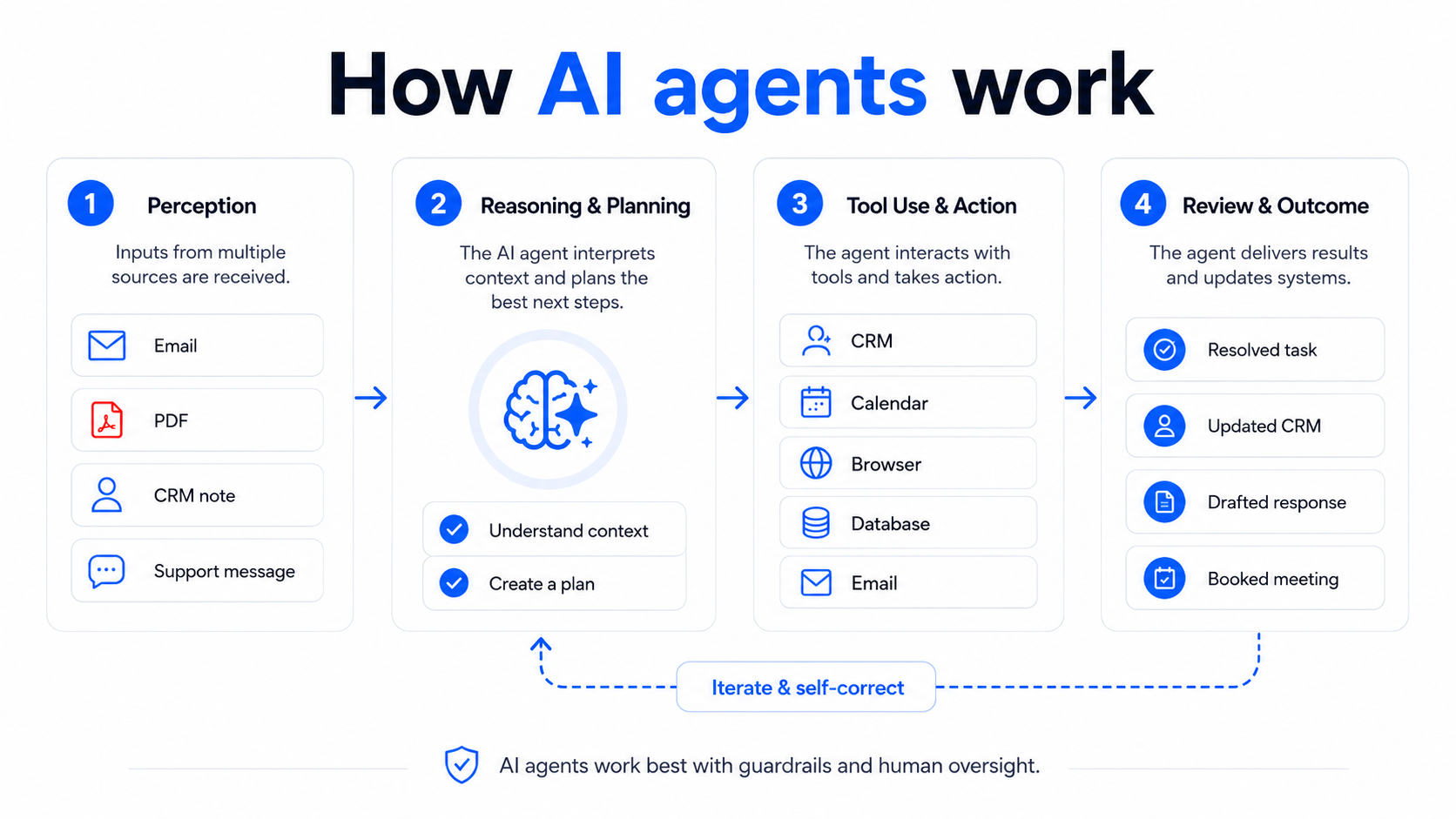 A common agent pattern is an iterative perceive-reason-act loop:
Perception: The agent receives structured or unstructured inputs such as emails, CRM records, PDFs, meeting notes, or system events.
Reasoning & Planning: The model interprets the objective, selects relevant knowledge or tools, and decides what steps are needed.
Execution & Evaluation: The agent calls permitted tools or APIs, inspects the result, and can continue, retry, ask for clarification, or escalate to a human depending on its guardrails.
Primary Use Cases for AI Agents
Customer Service Orchestration: Interpret a customer request, retrieve account context, suggest a resolution, and execute approved actions across support tools.
Unstructured Document Work: Read differently formatted documents, identify relevant fields, summarize information, and route exceptions for review.
Sales Research and Qualification: Review an inbound lead, combine CRM context with approved data sources, summarize fit, and prepare a personalized next step.
AI-Powered Feature vs. AI Agent: They Are Not the Same
One useful distinction for businesses: not every feature that uses AI is an agent. An OCR system that reads a business card, a model that summarizes a call, or an AI search feature may use machine learning without autonomously planning a multi-step workflow. For example, Tapni’s AI business card scanner uses AI to turn paper cards into structured contact data; that is an AI-powered feature. The deterministic step that then sends the contact to a CRM is traditional automation. An agent would go further by deciding what research to perform, how to qualify the lead, and which follow-up action to recommend.
If your team handles a lot of paper cards alongside NFC and QR sharing, see Tapni’s comparison of AI business card scanners for CRM integration.
To decide where each approach belongs, compare them across predictability, data, decision-making, maintenance, and risk.
1. Logic and Architecture
Traditional automation follows explicitly defined logic and produces predictable outputs for known inputs. AI agents use probabilistic models to interpret context and select actions, so the same input can sometimes produce different reasoning paths.
2. Data Requirements
Traditional automation works best when inputs can be validated against a known schema. AI agents are useful when workflows also contain natural language, images, documents, or incomplete context. In practice, many good systems convert messy inputs into structured data before handing execution back to conventional workflows.
3. Adaptability and Maintenance
Traditional automation can be extremely reliable when interfaces and rules are stable, but every new exception must be anticipated and implemented. Agents can handle a wider range of inputs without a separate rule for every wording or format, but they introduce a different maintenance burden: evaluation, prompt and tool design, permissions, monitoring, model changes, and safety controls.
4. Decision-Making Capability
Traditional automation evaluates conditions that developers define. AI agents can interpret intent and choose among permitted actions, which makes them useful for ambiguous work. That flexibility is also why they should not be treated as perfectly deterministic decision engines, especially for financial, legal, compliance, security, or other high-impact actions.
Sharon Amos, Director at Air Ambulance 1, says, “AI becomes more useful when it can interpret context instead of simply following a fixed set of rules. In situations where information arrives in different formats, that flexibility can help teams identify what matters and make decisions faster.”
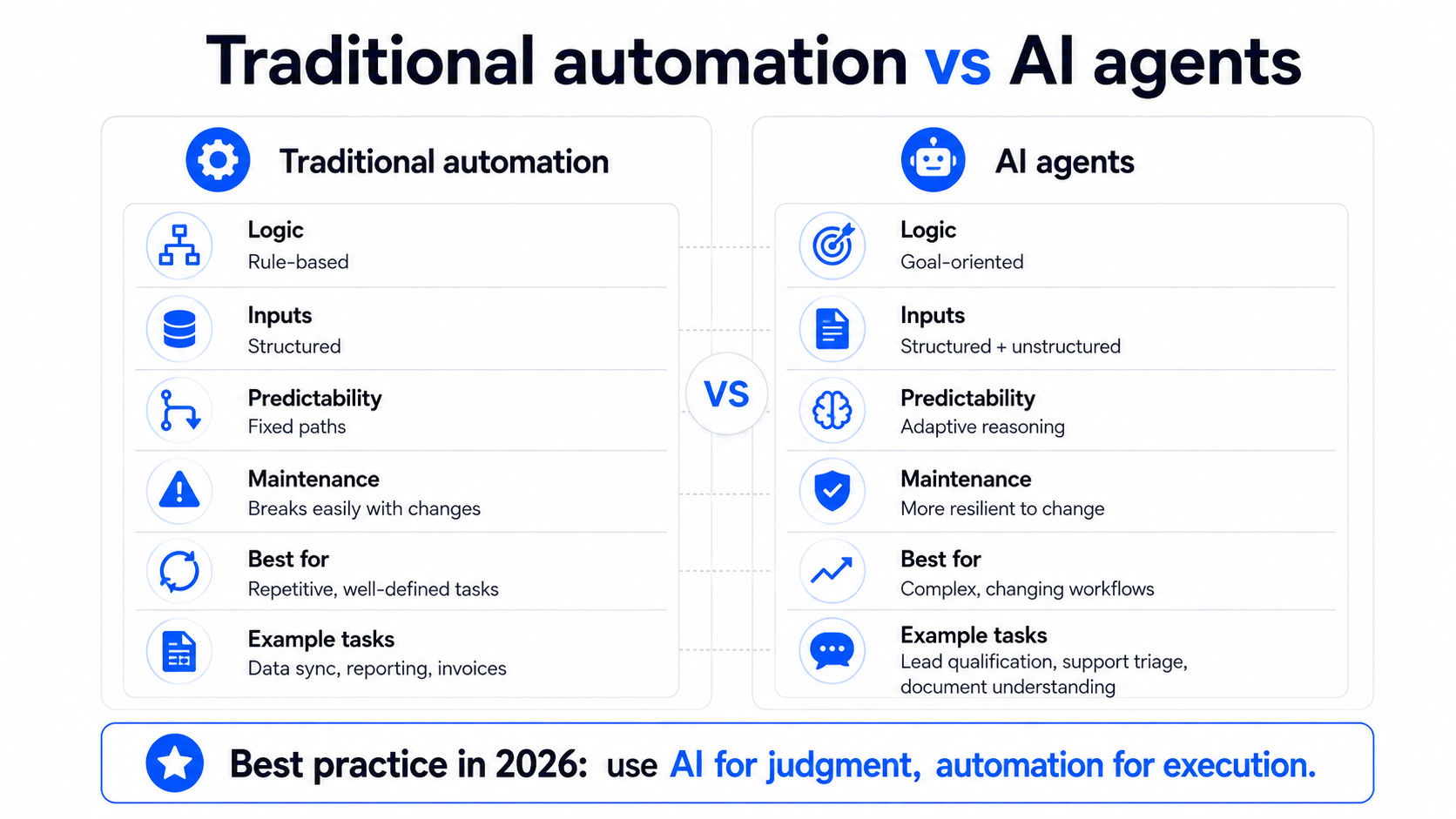
Neither approach is universally superior. The best choice depends on how predictable the workflow is, how much judgment it requires, and what happens if the system makes a mistake.
When to Use Traditional Automation
Use traditional automation when the rules are known, the data is structured, and consistency is the priority.
Financial and Audit-Sensitive Execution: Run calculations, approvals, and ledger updates using explicit rules and validated inputs.
High-Volume Data Syncing: Move structured records between a CRM, warehouse, ERP, or other systems on defined triggers.
Permissions and Compliance Workflows: Apply fixed policies, required fields, retention rules, or standardized reporting schemas.
When to Use AI Agents
Consider AI agents when the process contains ambiguity, unstructured information, or a changing sequence of steps:
Customer and Feedback Triage: Interpret open-ended messages, identify intent and urgency, and recommend the correct next action.
Personalized Sales and Support Preparation: Summarize context, research an account using approved sources, and draft a response for review.
Exception Handling: Investigate cases that fall outside normal rules, compare options, and escalate with a recommendation instead of simply failing the workflow.
Conrad Wang, Managing Director at EnableU, says: "AI agents shouldn't be viewed as a replacement for traditional automation. Think of them as a decision layer. Let AI handle ambiguity and reasoning, then hand structured tasks to deterministic workflows. That's where businesses see the greatest operational gains."
The strongest business architecture is usually hybrid. AI handles interpretation and choice where uncertainty is unavoidable; traditional automation handles execution where consistency, auditability, and speed matter most.
The Hybrid Automation Model
In a hybrid ecosystem:
AI Agent (Interpretation Layer): Reads an unstructured request or lead context, identifies what matters, and proposes the next step within defined permissions.
Traditional Automation (Execution Layer): Receives a validated command and performs reliable actions such as updating fields, assigning owners, creating tasks, triggering webhooks, or sending approved notifications.
David Finberg, CEO of Peaks Digital Marketing, says: "The businesses gaining a competitive advantage aren't choosing between AI and automation. They're combining both to eliminate repetitive work while giving teams better insights for faster, smarter decisions. That's where the real ROI comes from."
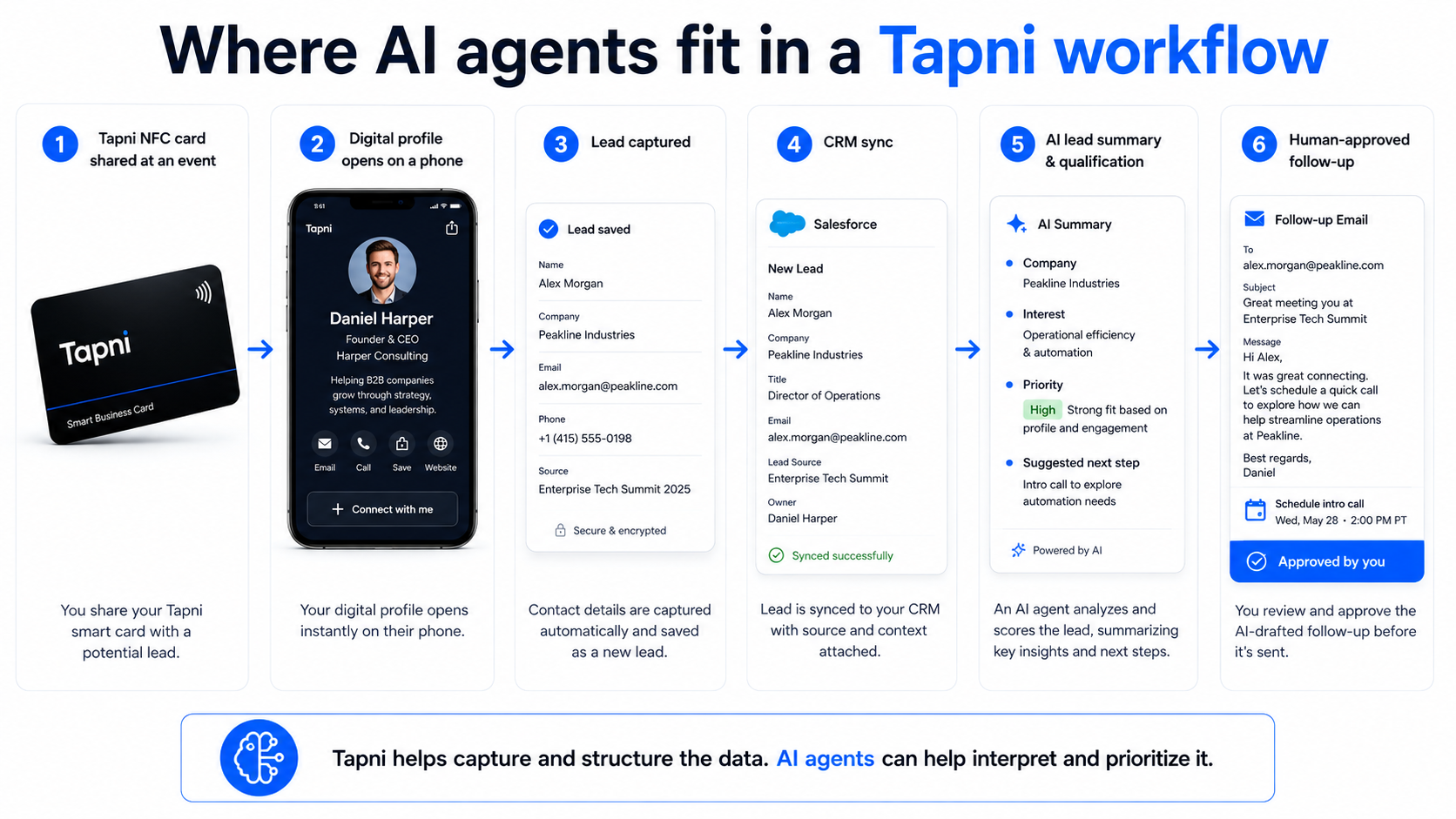
This is where the AI-vs.-automation distinction becomes concrete for Tapni’s audience. Imagine a sales rep meeting a prospect at a conference:
1. Share the profile. The rep taps a Tapni NFC business card or shows a QR code. Opening the digital business card is a predictable web action.
2. Capture the lead. The prospect submits an exchange form and the contact is sent to the company’s CRM. That is traditional automation: structured input, mapped fields, known destination.
3. Handle paper cards. If the prospect hands over a paper card, Tapni’s AI scanner can extract the contact details and turn the image into structured data.
4. Route and organize. CRM rules can tag the event source, assign the lead owner, create a task, and schedule a reminder.
5. Add agentic assistance where useful. An AI agent could review the rep’s notes, summarize the prospect’s likely needs, research the account using approved sources, and draft a personalized follow-up.
6. Keep high-impact actions controlled. A human can approve important outreach or pricing decisions, after which deterministic workflows send, log, and track the action.
This is a more realistic model of “AI automation” than replacing an entire sales process with an autonomous bot. For related workflows, see how to capture leads at events, how NFC cards provide real-time networking insights, and Tapni’s CRM integrations.
Real-World Example: Omnichannel Customer Feedback
Consider a business managing thousands of customer comments across web forms, email, chat, and social channels.
Traditional workflow: Keyword rules and predefined routing can categorize common cases quickly, but ambiguous messages may be misrouted or escalated unnecessarily.
AI-assisted workflow: A conversational layer or customer feedback platform can use AI to interpret free-text responses, ask clarifying questions, and produce structured intent or sentiment data.
Deterministic execution: Once the system has a validated classification or recommended resolution, conventional workflows can update the CRM, notify the right owner, and log the action consistently.
The advantage of this pattern is not “AI everywhere.” It is using AI where language and ambiguity create friction, then returning to predictable automation for the actions that need control and traceability.
If your team plans to modernize workflows in 2026, use a staged framework rather than replacing working automations simply because agentic AI is available.
Step 1: Audit Existing Workflows
Map the workflow from trigger to outcome. Mark the steps that are repetitive and predictable, the steps that repeatedly require human judgment, and the steps where errors would be costly. This immediately separates good automation candidates from good agent candidates.
Step 2: Evaluate Data Readiness
Agents are only as useful as the context and permissions they receive. Define the approved knowledge sources, CRM fields, product documentation, and tools they may access. Keep structured systems of record authoritative rather than allowing the model to become the source of truth.
Step 3: Define Governance and Guardrails
Establish clear operational boundaries before an agent can act:
Limit permissions. Give the agent only the data and tools required for its task; separate read access from write access wherever possible.
Add human approval for high-impact actions. Financial transfers, contractual commitments, sensitive account changes, mass outbound communication, and other irreversible actions should have explicit checkpoints.
Evaluate and monitor. Track task completion, incorrect actions, escalations, rework, latency, cost per completed task, and business outcomes. Agent quality should be measured, not assumed.
Step 4: Deploy Incrementally
Start with a contained workflow where the upside is measurable and a mistake is recoverable, for example, classifying inbound requests, summarizing sales notes, researching leads, or drafting follow-ups. Expand autonomy only after the system proves reliable under real operating conditions. Greg McRoberts, Founder & CMO of Verde Fulfillment USA, says, "The most successful AI implementations don't happen overnight. Start with one high-impact workflow, measure the results, and scale gradually. That approach reduces risk and helps teams adapt with confidence."
Step 5: Measure the Workflow, Not the Demo
Do not judge an agent by whether it can complete an impressive one-off task. Compare the full workflow before and after deployment: time saved per case, percentage completed without intervention, error and rework rate, cost per task, user satisfaction, and, where relevant, conversion or revenue impact. A simple automation that completes 99.9% of a narrow task may create more value than a sophisticated agent that succeeds only most of the time.
The boundary between workflows and agents will continue to blur as automation platforms add AI decision layers and agent platforms add stronger workflow controls. That does not make deterministic automation obsolete. It makes orchestration - the ability to hand work between models, humans, and reliable software - more important.
Gregor Emmian, Deputy Chief Digital Growth Officer at Rise, says, "The companies seeing the greatest return from AI aren't chasing every new capability. They're using AI where it improves decisions and customer experiences while keeping proven automation in place for predictable, repeatable work. That balanced approach creates sustainable growth."
A resilient stack keeps systems of record and critical actions predictable while using AI selectively for interpretation, research, drafting, and exception handling. In sales and networking, that can mean combining AI-assisted contact capture with CRM rules, structured lead ownership, reminders, and human judgment.
The same principle applies to feedback collection. An online survey tool can collect structured and open-ended responses; AI can interpret the unstructured parts, while conventional workflows handle routing, CRM updates, and reporting.
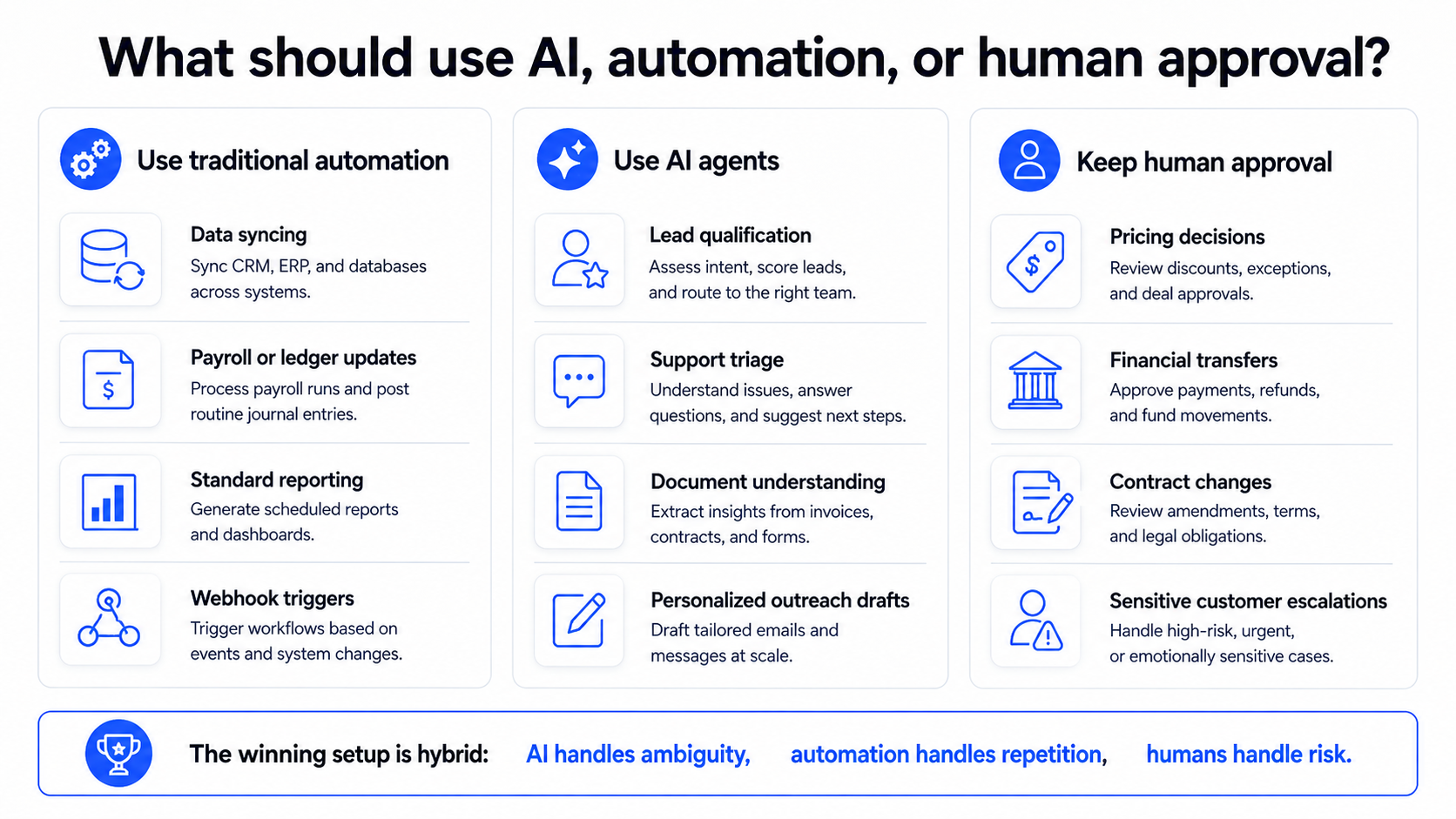
The debate between AI agents and traditional automation is not about choosing a winner. It is about matching the technology to the uncertainty, risk, and repeatability of the work.
Traditional automation remains the best fit for structured, repeatable workflows where predictable execution is the objective.
AI agents are useful when software must interpret context, choose among tools, or work through ambiguous multi-step tasks - but they require stronger evaluation, permissions, and oversight.
For most businesses in 2026, the practical answer is hybrid: automate what should be predictable and use AI where ambiguity creates real manual work. Tapni is a simple example of that philosophy in networking: the smart business card creates the connection, AI-assisted scanning can structure information from paper cards, and Tapni for Business can move captured leads into CRM workflows for organized follow-up. The goal is not more AI. It is fewer lost contacts, less manual work, and a cleaner path from conversation to customer.